

If you use Entra Global Secure Access (What is Global Secure Access? – Global Secure Access | Microsoft Learn) to protect connectivity to M365, Internet or internal network from your devices, you must be aware that a new version (2.32.294) has been made available for Windows devices (both x64 and ARM).
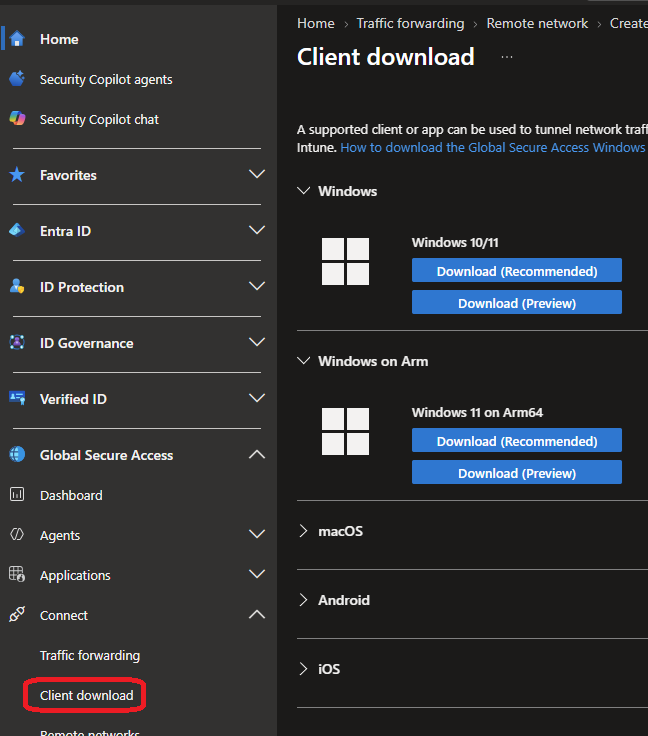
Your administrators can download the new version from the Entra ID portal, under the Global Secure Access\Connect\Client download blade
Direct links:
This new version introduces a Prefer local network option when local subnets are overlapping with private applications.
Also, Global Secure Access client will be automatically updated starting November 2026 through Windows Update. This is a great news as administrators will no longer need to monitor for new version and package them.
To take advantage of this incoming automatic update process, you need to run these minimum versions:
- x64: 2.31.125 (released in June 2026) – off course it is better to deploy the latest version now
- ARM: 2.32.294 (this new version)
Off course you will need to update your detection rule to look at version greater than or equal to
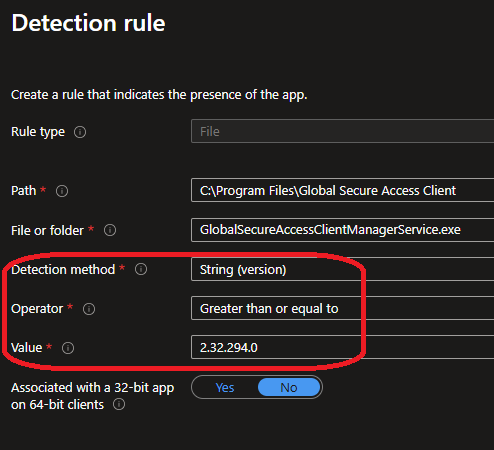
If you want to opt-out the automatic update, you need to use this new install parameter EnableWindowsUpdates=0
<Global Secure Access installer file> /quiet /norestart EnableWindowsUpdates=0