

With the increase use of intelligence artificial (IA) and bots, it more than likely you will get meeting participants joining with external bots to keep track of the meeting details (recording, transcript….).
While Microsoft has introduced few months a meeting policy setting (Teams – You can now control if bot are authorized to join a meeting) to manage external bots joining a meeting, this setting had only 2 options:
- Do not detect which means bots can join without control
- Block but allows organizer to allow it, which means external bots may be authorized to join a meeting while they should not because of the organizer decision
These 2 options do not allow Teams administrators to fully block bots joining a meeting.
Well, a new option has been introduced to fully block bots joining a meeting.
Remember this is a meeting policy setting, which means it can not be set for one specific meeting but will apply to all meetings organized by users to whom the policy is applying to.
To turn on the option to block all external bots, connect to your Teams administration portal (Dashboard – Microsoft Teams admin center) to access the Meeting policy settings to edit either the global or custom policies.
Once editing the Teams meeting policy, locate the Manage external bots and their access to meeting option (under the Meeting join & lobby section) to select Block detected bots from joining option
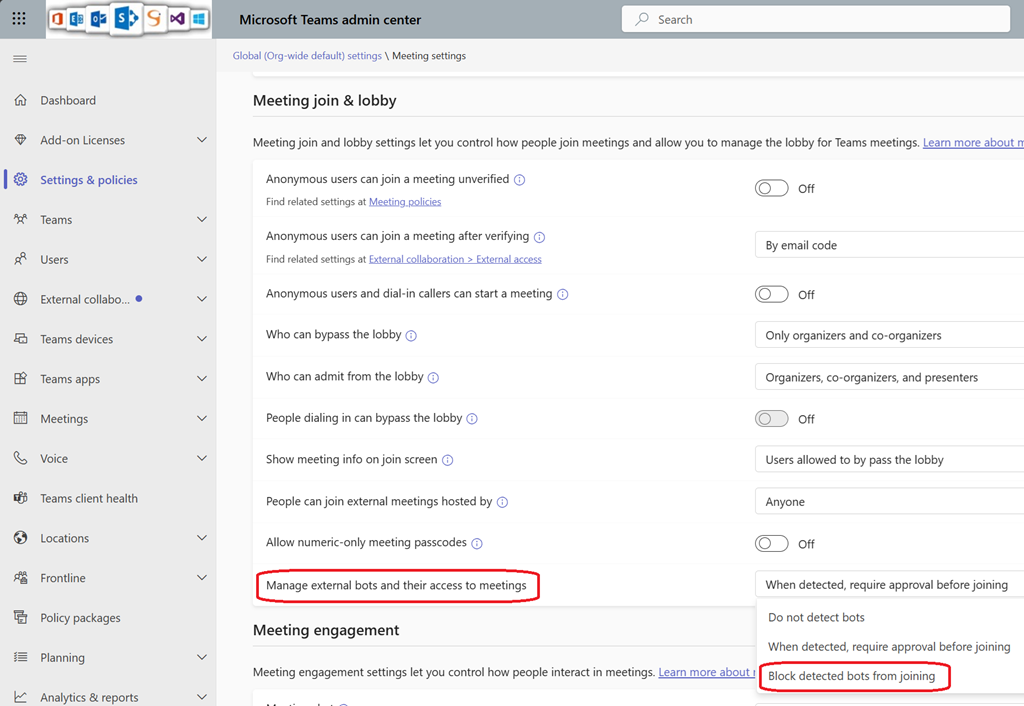
So instead relying on end-users decision to allow an external bot to join a meeting, it can now be fully blocked.