

As you probably already know, you can integrate your on-premise web applications with Entra to leverage Entra authentication and access control capabilities without having to open inbound ports on your perimeter firewall.
This is called Entra ID Private Connector, formerly know as Application Proxy.
Well, a new version (1.5.4892.0) has been made available for download only; this version will not self update existing private connector instances.
This new version does not include any new feature or capability, instead just bugs fix or improvement:
- Diagnostics tool added to system tray: New interactive diagnostics experience that validates endpoint connectivity (including customer-configured outbound proxies), checks service health, and collects logs from Windows Event Viewer.
- Improved connector logging and observability: Connector logs available in Windows Event Viewer; Audit events include agent identity information; and a remote feature flag allows log verbosity control without a connector update.
- Improved DNS resolution reliability: Invalid DNS response records are now filtered out, preventing spurious resolution failures in certain network environments.
- Fixed WebSocket connection leaks that could cause port exhaustion. Connections to unresponsive backends are now properly closed with a configurable timeout instead of lingering indefinitely.
- Fixed an issue where the connector’s control channel listener could fail to initialize when specific features were disabled, causing the connector to not start.
To check the current version of your connector, connect to your Entra ID portal (Microsoft Entra – Microsoft Entra admin center) to access the Enterprise apps\Private Network Connectors blade (Enterprise applications – Microsoft Entra admin center)
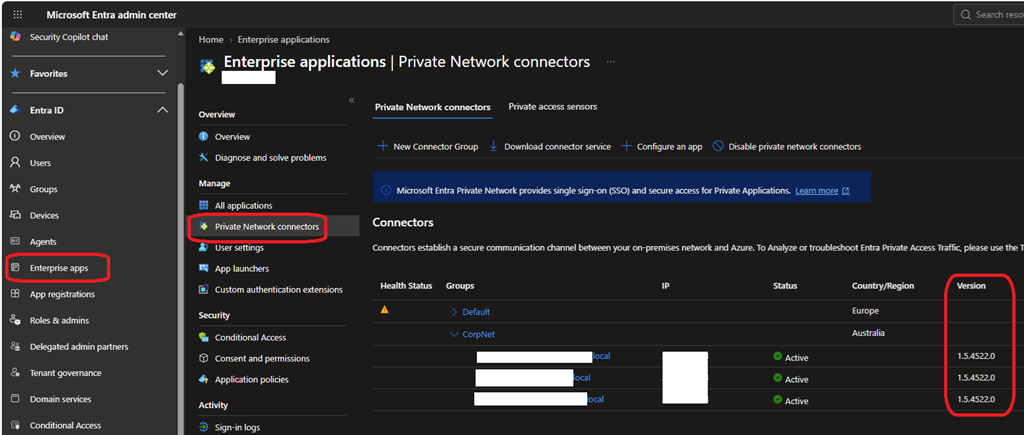
This blade will also help you identify which server(s) are running an instance of private connector as after some time it may be forgotten.
Download the new version from here Entra ID Private Connector.