

As you may already know, you can define an expiration time (between 1 to 720 days) for anyone sharing link (aka anonymous link) from the SharePoint Administration portal


This setting applies to all SharePoint Online site without any exception.
Well, this is changing as now you can set a ‘custom’ expiration time for specific site.
To do so you will need to download and install the latest SharePoint Online PowerShell module (version 16.0.9021.1200 available at https://www.microsoft.com/en-us/download/details.aspx?id=35588)
Then you connect to your SharePoint tenant using the below command
Connect-SPOService -Url https://<your tenant>-admin.sharepoint.com
Then you need to run the below command to overwrite the global setting and define your specific expiration time
Set-SPOSite -Identity https://<your SPO site URL> -OverrideTenantAnonymousLinkExpirationPolicy $true –AnonymousLinkExpirationInDays <number of days>
You can then confirm it using the command
Get-SPOSite -Identity https://<your SPO site URL> | fl OverrideTenantAnonymousLinkExpirationPolicy,AnonymousLinkExpirationInDays
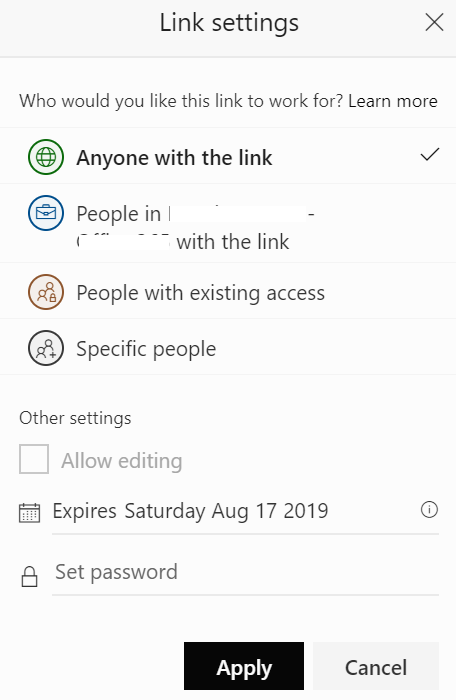
The new expiration time is immediately applied and next time end-user is sharing with anyone, the expiration date is automatically set to match the overwritten setting as shown below with an expiration time set to 15 days – as you can see the expiration date has been set to today (August 2nd, 2019) + 15 days
In a future update, this option will become also available through the ‘new/modern’ SharePoint Online Administration portal.
If you want to revert back to the global setting, then just run the command
Set-SPOSite -Identity https://<your SPO site URL> -OverrideTenantAnonymousLinkExpirationPolicy $false –AnonymousLinkExpirationInDays 0