

If you are managing Azure environments, you should already know about Azure policies/initiatives to enforce compliance/remediate compliance requirements such as authorized deployment regions or requiring tags.
Until then, an Azure administrator could edit custom policy or initiative and keep the version to 1.0.0 (default).
Well, now when you are editing a custom policy or initiative, it is required to update the “New version” field.
The idea behind this requirement to update the version is to help Azure administrators to roll back to a known policy/initiative version when a change has been introduced and cause troubles.
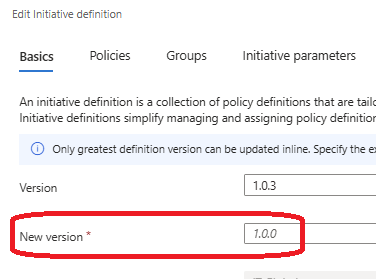
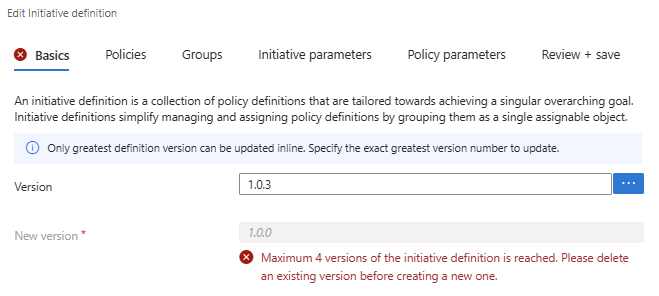
NOTE it is important to note that this enforcement has a limitation to up to 4 edited version; if this limit has been reached it is required to first delete at least one of the previous version to be able to edit the custom policy/initiative.
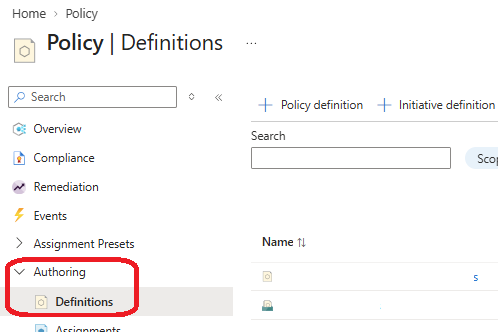
To delete a policy/initiative version, open the Azure portal to access the policy blade (Policy – Microsoft Azure) to select to the policy/initiative you need to edit and delete previous version(s) under the Authoring\Definitions blade.
When you open the corresponding custom policy/initiative, you can select the Delete version button to select the version you want to delete by opening the contextual menu. You need to repeat it if you need to delete all previous versions.
