

If you work with Intune, you likely already know the various security baselines for Windows, Office apps or Edge.
Similarly, you have recommendations or Identity score in Entra to help maintain a security level.
Unfortunately, such capability did not exist for Office 365 to help you implement and manage security level for your Office 365 workloads.
Well, good news as a security baseline is being introduced for Office 365 to help you implement security best practices across all Office 365 workloads, while it will also deliver an ongoing updates.
This baseline security mode (BSM) starts with Entra, SharePoint/Onedrive and Office applications; more workloads such as Intune, Exchange or Teams will come at later stage (this is currently private preview).
To implement BSM on your tenant, connect to your Office 365 administration portal (Microsoft 365 admin center) to access the Settings\Org settings\Security & privacy blade
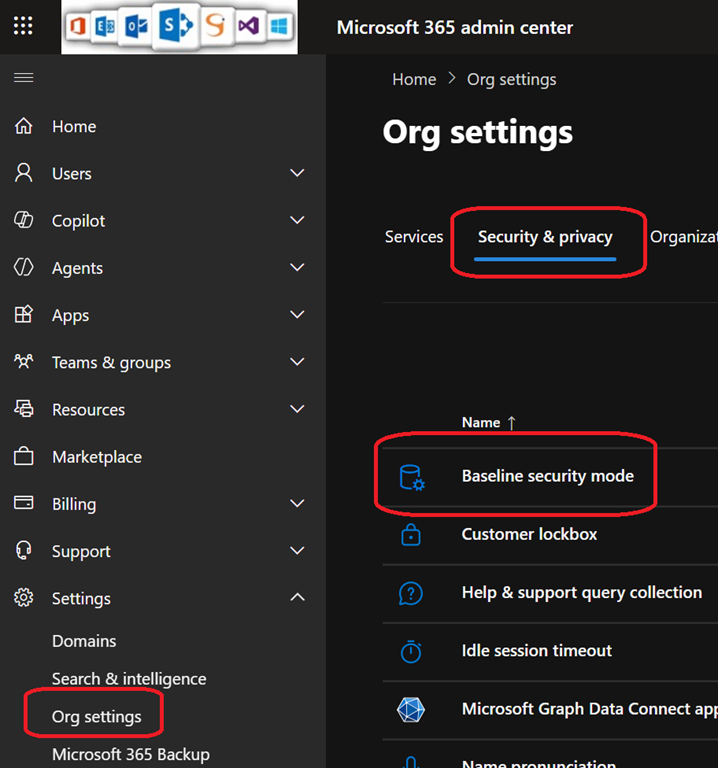
By selecting the Baseline security mode, you can then review and enable the default settings
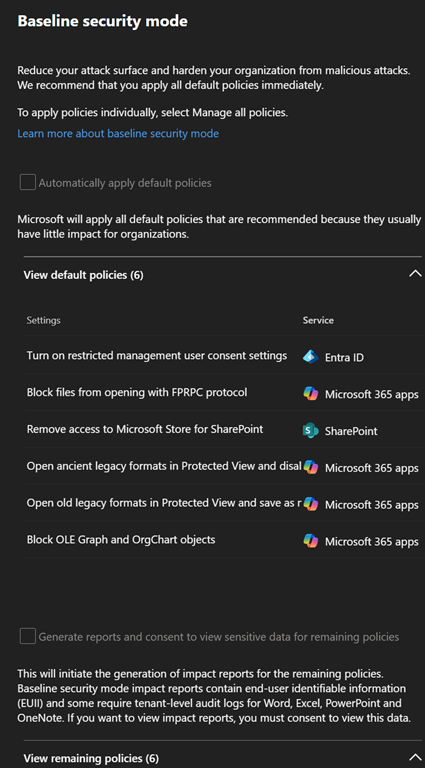
The rules may vary from a tenant to another, depending of your existing configuration and identify which best practice(s) are missing in your tenant.
It is important to note these rules apply at the tenant level and can not be targeted to specific groups.