

As you know, for your devices to apply device configuration profiles from Intune, your device must be enrolled in Intune.
Intune enrollment can be done in different ways: automatic or manual.
The automatic enrollment for Windows devices can then be done either using group policy in the context of hybrid-joined device (not recommended) or using a specific CNAME DNS record (enterpriseeenrollment) for the public domain used for authentication.
Well, it is important to note that Microsoft is planning to deprecate the use of this CNAME record starting January 15th, 2027.
This means automatic enrollment for new devices after this date will no longer use the DNS to locate the Intune registration endpoint (https://enrollment.manage.microsoft.com/enrollmentserver/discovery.svc).
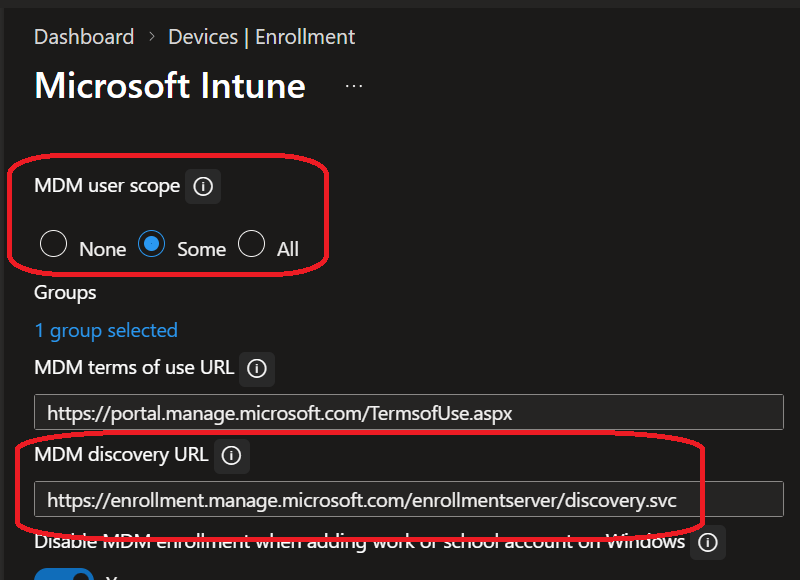
This deprecation does not mean you will need to manually enter the endpoint URL during enrollment, it just means you need to ensure your Intune Windows automatic enrollment settings are properly configured, similar to the below:
- MDM User Scope set to either Some or All; in case of using the “Some” option, ensure the user is member of the selected group(s)
- MDM Discovery URL is properly set to https://enrollment.manage.microsoft.com/enrollmentserver/discovery.svc
NOTE this does not remove the licensing requirement for end-user to register the device into Intune
If one of these settings is incorrect or not configured, then you will need to manually provide the enrollment endpoint URL during enrollment
To be prepared for this change, you need to:
- Identify enrollment workflows to identify who/which device may be impacted
- Review your Intune Windows automatic enrollments settings
- Test the enrollment without the CNAME record; unfortunately this means you need to delete the record from your domain(s)
I have personally tested on my own environment (Entra Joined only, not hybrid and no group policy) after deleting the record and my test VM has been successfully registered in Intune