

As IT administrator, you may want/need to remove preinstalled/default Windows Store apps (such as Solitaire, Feedback hub or Clipchamp).
Until now, you had either to use script or deploy these applications from Intune in uninstall mode.
Unfortunately, this does not block end-user to install again these applications (even if they eventually will be uninstalled again).
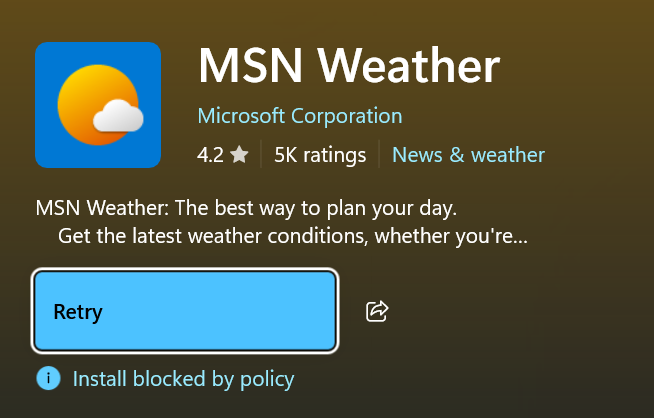
After implementing this policy, when a user tries to install again one of the supported application, the installation will fail with the error “Install blocked by policy”
Well, good news, as now you can use either Intune configuration profile or a group policy.
Before we dig to the configuration, you need to meet the following requirements:
- Windows version and edition: Devices must be running Windows 11 Enterprise or Education, version 25H2 or newer
- Device enrollment/domain join: Devices must be MDM-enrolled to use the CSP policy or be domain-joined for Group Policy Object (GPO) to receive the policy.
- Targeting: Target devices (not users) with this device-level policy for it to take effect
If you are using group policy, you need to update your ADMX using the latest Windows 11 25H2 (or later) version available for download from Download Administrative Templates (.admx) for Windows 11 2025 Update (25H2) from Official Microsoft Download Center.
Once you match these requirements you can implement the policy using either Intune or group policy.
The option is available under the (Computer Configuration if using group policy, for Intune use a Settings catalog profile type) Administrative Templates\Windows Components\App Package Deployment
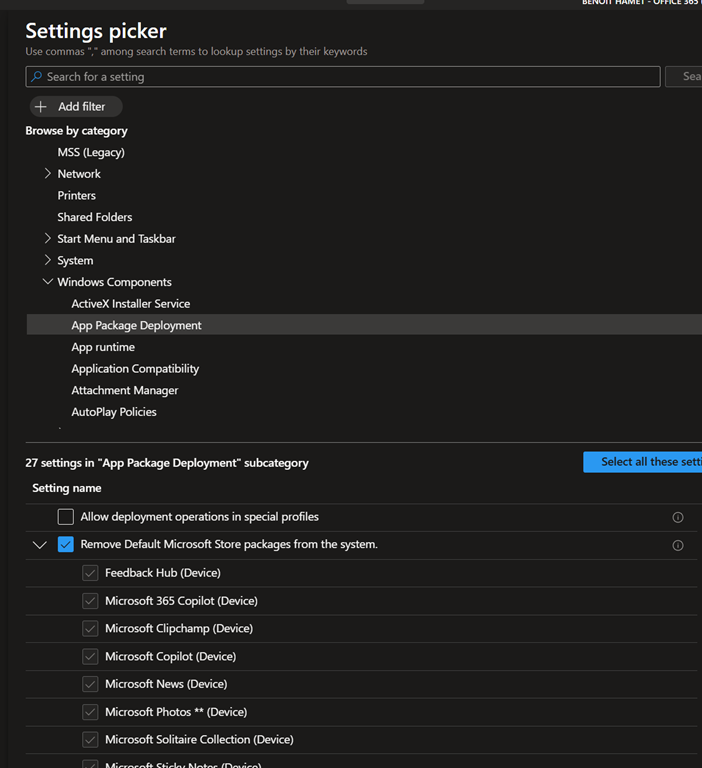
You can select all or some of the preinstalled applications to be uninstalled.
Once implemented the removal occurs either during user login or device provisioning; if a user is already logged on, applications will be removed only at the next sign in.
And more importantly, end-user will not be able to install again these applications.
The list of applications currently supported by the policy are:
- Feedback Hub
- Microsoft 365 Copilot
- Microsoft Clipchamp
- Microsoft Copilot
- Microsoft News
- Microsoft Photos
- Microsoft Solitaire Collection
- Microsoft Sticky Notes
- Microsoft Teams
- Microsoft To Do
- MSN Weather
- Outlook for Windows
- Paint
- Quick Assist
- Snipping Tool
- Windows Calculator
- Windows Camera
- Windows Media Player
- Windows Notepad
- Windows Sound Recorder
- Windows Terminal
- Xbox Gaming App
- Xbox Identity Provider
- Xbox Speech To Text Overlay
- Xbox TCUI