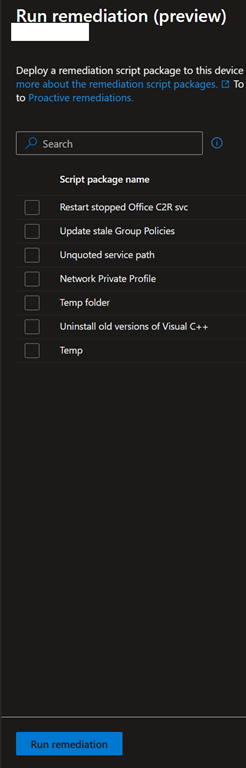
If you are Intune administrator, you should already know (and hopefully using) remediation scripts capability which allows you to run detection and remediation scripts on device to maintain specific configuration which are not available through profiles (see Use Remediations to Detect and Fix Support Issues – Microsoft Intune | Microsoft Learn).
Until now, remediation scripts had a big limitation as it they were running only on a scheduled basis and for all targeted devices; there was no way to manually select one (or more) remediation script and execute it on demand for a specific device.
Well, good news as Microsoft has improved (for new in preview with the limitation around supportability) the remediation scripts capability to allow you running them on demand and on a specific device.
It has been quietly introduced (honestly not sure since when it has been made available).
To run one or more remediation script(s) on a specific device, just connect to your Intune portal (Dashboard – Microsoft Intune admin center) to access the Devices\By platforms\Windows blade to select the device you want to run the remediation script(s) to
From the device Overview blade, open the More menu option (the ellipsis) to select Run remediation

From there, you can select any existing remediation script to be executed on the device