

Ensuring your virtual machine and workloads running on it is an important task to maintain your security posture.
You probably know that you can manage updates management on Azure using Azure Update Manager (https://learn.microsoft.com/en-us/azure/update-center/overview?tabs=azure-vms).
Well, Azure Update Manager can now be used to also update your SQL instance running on a virtual machine.
To do so, connect to your Azure portal (https://portal.azure.com/) to access the SQL virtual machine you want to get Azure Update Manager to update SQL and go to the Updates blade to switch to the new Update Manager (Try New Azure Update Manager)

Then enable Microsoft Updates using the Settings option



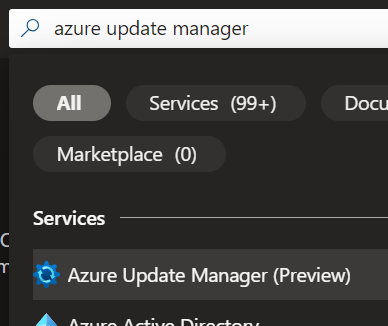
You can also do it in bulk by accessing Azure Update Manager (preview) and select the SQL virtual machines you want to onboard
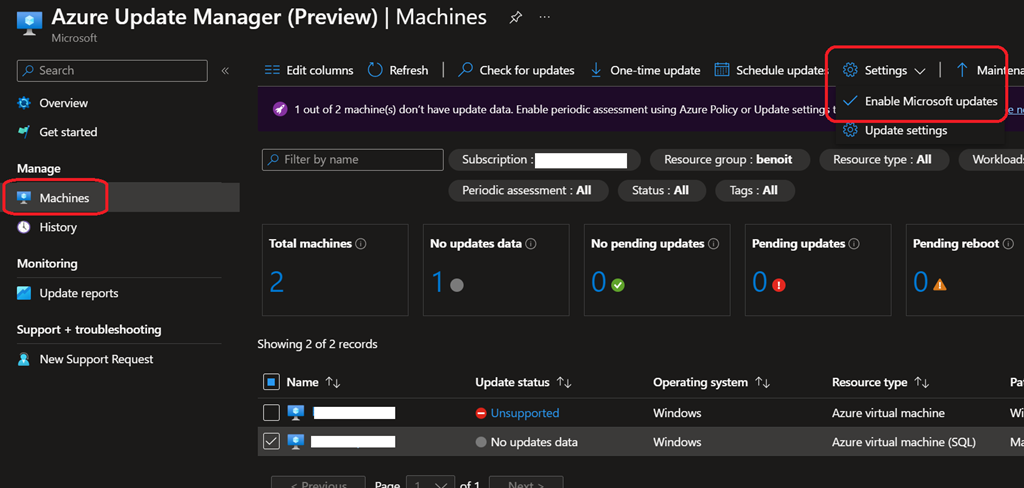
You can then configure the updates management to run periodic assessment, schedule updates installation…
NOTE it is recommended to disable other patching solution (such as Automation Update management – which is on the path for retirement [August 31, 2024]) you may be using.