

As you know Intune/Endpoint Configuration Manager can be used to deploy applications (either LOB [MSI, MSIX, APPX…] or Win32 apps [Intune package]).
While deploying applications with Intune, the description field of the deployment is a mandatory field and not much look at as this is usually prepopulated by Intune using the application name.
Well, you can provide a better description by formatting it using markdown.
The markdowns available will let you:
- set the font formatting (bold, italic, strikethrough)
- include a link
- define a list
- and even use style (headers, quote or inline code)
The corresponding codes are
| Formatting | Code |
|
Italic |
*Italic* |
|
Bold |
**Bold** |
|
Bold and Italic |
***Bold and Italic*** |
|
Strikethrough |
~~Strikethrough~~ |
|
Link |
[Link](<link to include>) |
|
Inline Code |
`Inline Code` |
|
Unordered list |
* Unordered list |
|
Ordered list |
1. Ordered list |
|
Block quote |
> Block quote |
|
Header 1 |
# Header 1 |
|
Header 2 |
## Header 2 |
|
Header 3 |
### Header 3 |
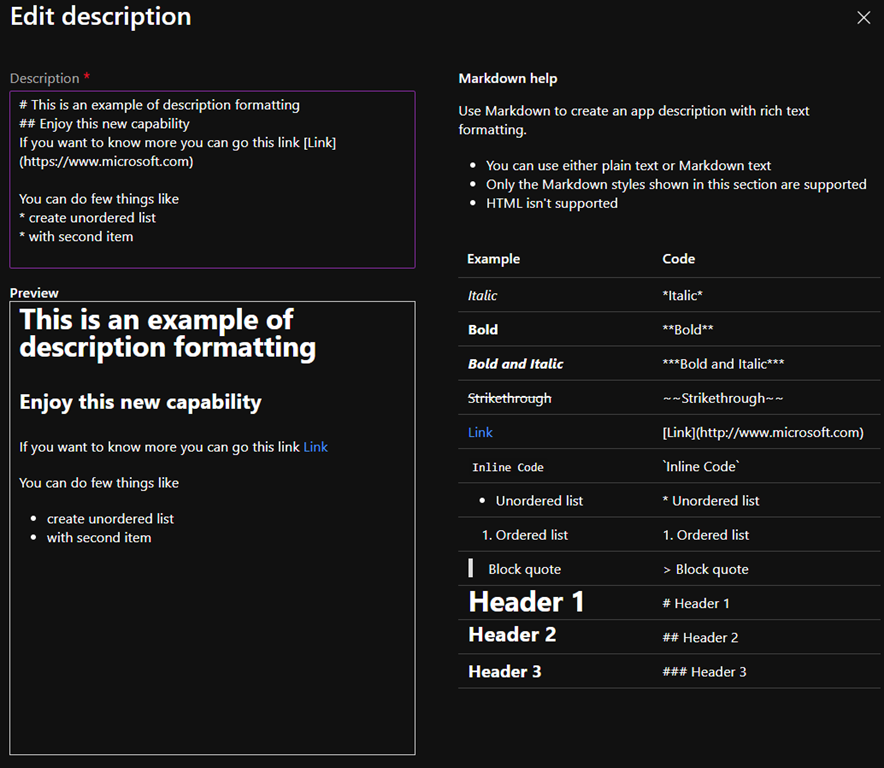
This is available for any type of application (LOB, Win32) you deployed
Which then will make you application description looks like
