If you have deployed Exchange 2013 within an environment with Exchange 2007 or 2010 already deployed (don’t forget you must have deployed SP3 for Exchange 2010 or SP4 for Exchange 2007), you may experienced issue when downloading OAB with Outlook for users which have been moved to Exchange 2013 (Outlook Send/Receive generates 0x8004010F An object cannot be found error or Microsoft Exchange offline address book 0X8004010F error in the synchronization issues folder).

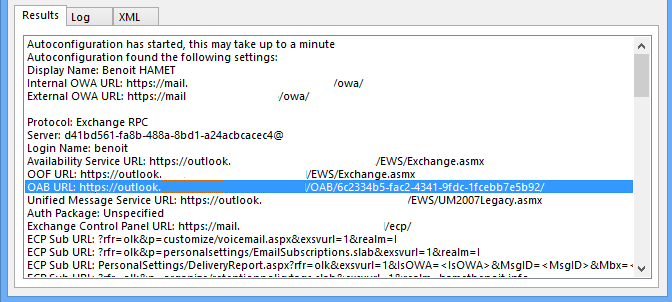
If you check autodiscover settings thanks to Test E-mail Autoconfiguration you may see no OAB URL defined – there is no URL neither no OAB parameter.


To solve this issue, log on to an Exchange 2013 server, launch EMS (Exchange Management Shell) and run the following command
Get-offlineaddressbook | fl WebDistributionEnabled,VirtualDirectories,Identity
If you have WebDistributionEnabled set to False and/or no value defined for VirtualDirectories (as shown below) this is why you have the issue

To solve this issue, run the following command
Get-ClientAccessServer | Get-OabVirtualDirectory | fl identity to get OAB virtual directory identity (this will be required for the next command)
Set-OfflineAddressBook -VirtualDirectories "<OAB vDir Identity from the previous command>" –Identity <OAB Identity>
Wait a little bit and try a new autodiscover check; you should now have OAB URL parameter and value.