As you know, Microsoft has introduced Secure Boot with Windows 8 (2011) and has become more important with Windows 10 and Windows 11 (this is even a prerequisites).
Well, in June 2026 (as announced in November 2025 Secure Boot playbook for certificates expiring in 2026) certificates used by Secure Boot are going to expire.
You need to act before this deadline to ensure certificates are updated, otherwise your devices will no longer start.
You have 2 options to ensure Secure Boot certificates are updated:
- Intune (recommended)
- Group policy
Use Intune
Device must send required diagnostic data to Microsoft, if not yet configured (see Configure Windows diagnostic data in your organization – Windows Privacy | Microsoft Learn)
Create or update a Settings Catalog profile to enable the below Secure Boot settings:
- Configure High Confidence Opt Out: controls whether Secure Boot certificate updates are applied automatically through Windows monthly security and non-security updates. Only devices with sufficient diagnostic data can be considered with high confidence; if diagnostic data is unavailable for a given device, it cannot be classified with high confidence
- Configure Microsoft Update Managed Opt In: allows Secure Boot certificate update managed by Microsoft
- Enable Secureboot Certificate Updates: controls whether Windows initiates the Secure Boot certificate deployment process on devices

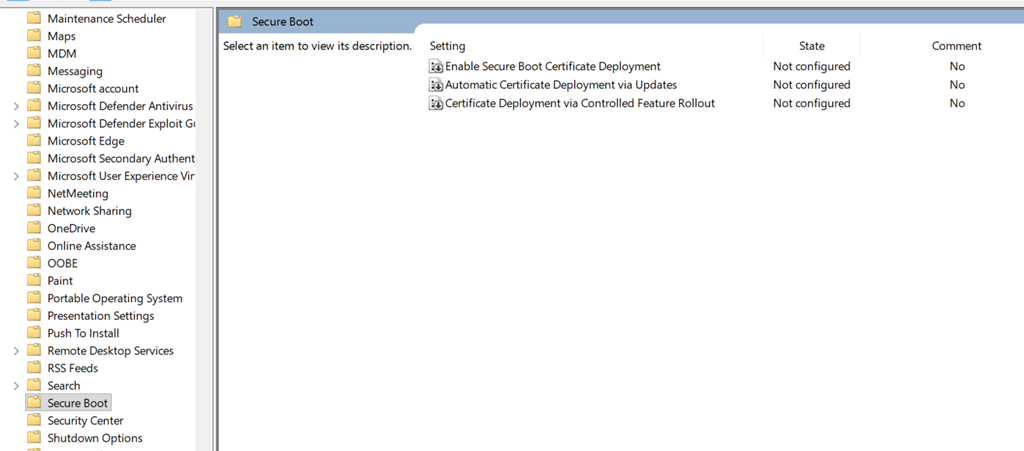
Use Group Policy
This option also applies to servers (including in workgroup mode).
The same settings as above must be configured, with the same diagnostic data requirement.
The options are available under the Computer Configuration\Administrative Templates\Windows Components\Secure Boot tree
If the Secure Boot branch is not showing up, you need to download the updated ADMX files from Download Administrative Templates (.admx) for Windows Server 2025 (October 25 release) from Official Microsoft Download Center