

If you use Azure services, especially storage account, you already know that most services provide a failover capability – mostly unmanaged/unexpected – in case the primary location is becoming unavailable for various reasons.
Well, for storage account, until now only unexpected unavailability would triggered an automatic failover, depending of the storage account redundancy. This is obviously not available for LRS (locally-redundant storage) configuration.
Good news as now you can manually trigger a failover of your storage account.
This new option allows you for planning and testing storage account failover instead of waiting/expecting an Azure outage which would trigger the failover.
This can help validating and testing the failover capability for Azure storage account.
To enjoy this capability, you need off course to have your storage account configured for redundancy.
To start a planned failover, access your storage account and trigger the Failover to select Planned failover from the Redundancy blade.
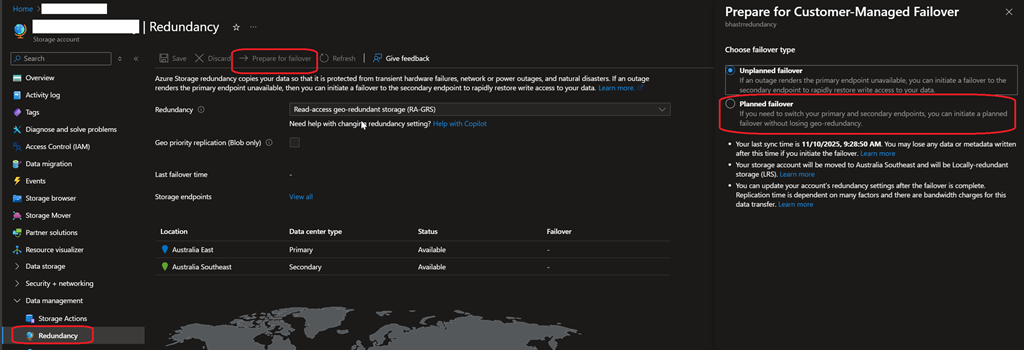
You need to know the following first:
| Unplanned Failover | Planned Failover |
| After an unplanned failover the storage account is converted to Locally Redundant Storage (LRS) and the secondary region becomes the new primary region. | After a planned failover the storage account remains Geo Redundant Storage (GRS) while the secondary region becomes the new primary region, and the primary region becomes the new secondary region. |
| Once an unplanned failover is initiated the operation begins immediately. Writes that were pending replication to the secondary region (made after the Last Sync Time) will potentially be lost. Users can utilize their Last Sync Time to determine the recovery point of their storage account. |
Once a planned failover is initiated the first step is replicating pending writes (writes made after the Last Sync Time) to the secondary region. As a result, the Last Sync Time is caught up and there should be no data loss. |
| Primary use case: a storage related outage in the primary region. | Primary use case: to test the Failover workflow or a non-storage related outage in the primary region. |
| Can be used when the primary storage endpoint becomes unavailable (there is a storage related outage on the primary region). | Works while the primary and secondary storage endpoints are available. |
To get complete details about planned storage account failover, go to How customer-managed planned failover works – Azure Storage | Microsoft Learn