

NOTE this post was originally posted in October 2nd and has now been updated with instructions from the Entra ID portal
As you know, Entra ID Conditional Access policies play an important role in securing to your resources integrated with Entra ID for authentication (such as M365, Azure or third-party cloud apps).
If you have the proper permissions (at least Conditional Access Administrator administrator role), it is easy to create, edit or delete conditional policies.
Sometime, mistakes happen and administrators delete conditional access policy/ies which should not have been deleted.
Until now, the only option was to manually recreate the deleted policy/ies, expecting they were properly documented to avoid additional issues – which usually is not the case.
Well, good news as Entra ID is now capable to list and recover deleted conditional access policies  .
.
As for almost every single recycle bin capability in Microsoft cloud services, deleted conditional access policies can be listed and recovered within the 30 days after the deletion.
First thing first, this recovery option is not available from the Entra ID portal from Entra ID and you need to use through Microsoft Graph use the below command
Install Microsoft Graph
- For the current user only
Install-Module Microsoft.Graph -Scope CurrentUser
- For all users – requires local administrator privileges
Install-Module Microsoft.Graph -Scope AllUsers
For the purpose of this post, I have created and then deleted a conditional access policy.
View deleted conditional access policies from Entra ID portal
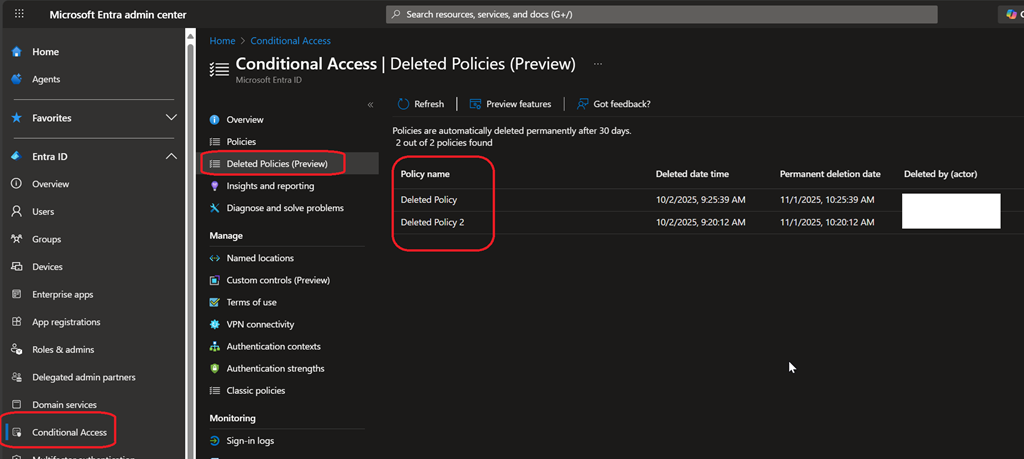
- Connect to your Entra ID portal (Microsoft Entra – Microsoft Entra admin center) to access the Conditional Access blade
- From there you will see a new Deleted policies (preview) blade listing all deleted conditional access policies
Recover deleted policy from Entra ID portal
- From the Conditional Access\Deleted policies blade, open the contextual menu and select Restore

Permanently delete policy from Entra ID portal
- From the Conditional Access\Deleted policies blade, open the contextual menu and select Delete permanently

List deleted conditional access policies with Graph
To list the deleted conditional access policies, you need to connect to Microsoft Graph limited to the policies scope
Connect-MgGraph -Scope “Policy.Read.All”
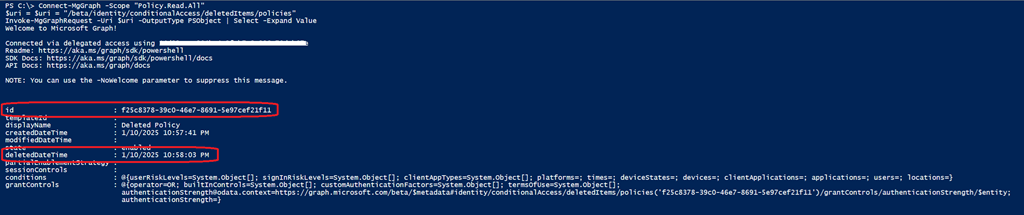
Then you can list all deleted conditional access policies with the below command
$uri = $uri = “/beta/identity/conditionalAccess/deletedItems/policies”
Invoke-MgGraphRequest -Uri $uri -OutputType PSObject | Select -Expand Value
The ID attribute will be the important one to grab for recovering the deleted conditional access policy
Recover deleted policy with Graph
To recover a deleted policy you need adjust your Graph scope to allow write access and the conditional access policy ID
Connect-MgGraph -scope “Policy.ReadWrite.ConditionalAccess”
$policyId = “<deleted conditional access policy ID to recover>”
$uri = “beta/identity/conditionalAccess/deletedItems/policies/$policyId/restore”
Invoke-MgGraphRequest -Uri $uri -Method Post
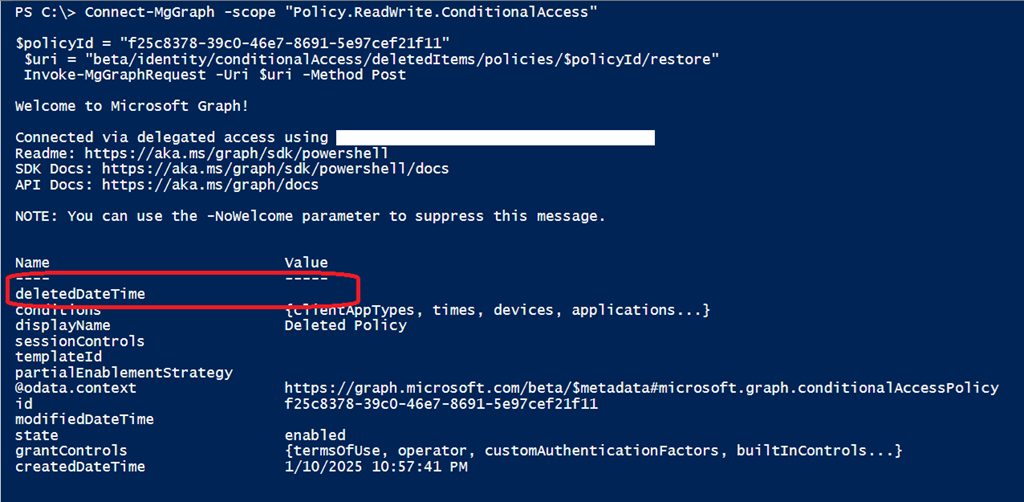
Once successful recovered, the deletedDateTime attribute value is empty and the policy is showing back in the Entra ID Conditional Access policies blade.