

As you probably know, Microsoft has been developing a new Teams client to provide better performance (more details here https://learn.microsoft.com/en-us/microsoftteams/new-teams-desktop-admin/).
Well, starting September 2023 through December 2023, this new Teams desktop client will be included as part of new and existing Microsoft 365 Apps (Office client).
Expected deployment schedule:
- Business plans
- September 2023
- Enterprise plans (Ex)
- Office Beta Channel and Current Channel (Preview): September 2023
- Current Channel: October 2023
- Monthly Enterprise Channel and Semi-Annual Enterprise Channel (Preview): November 2023
- Semi-Annual Enterprise Channel: December 2023
At these dates, the new client will be deploy and become the default Teams client.
The current (‘legacy’) Teams client will continue to be available.
To allow better deployment control, Microsoft is providing a settings to allow/block the new client deployment.
This settings is available from the Apps administration center (https://config.office.com/) by accessing the Customization\Device Configuration blade and then the Modern Apps settings tab
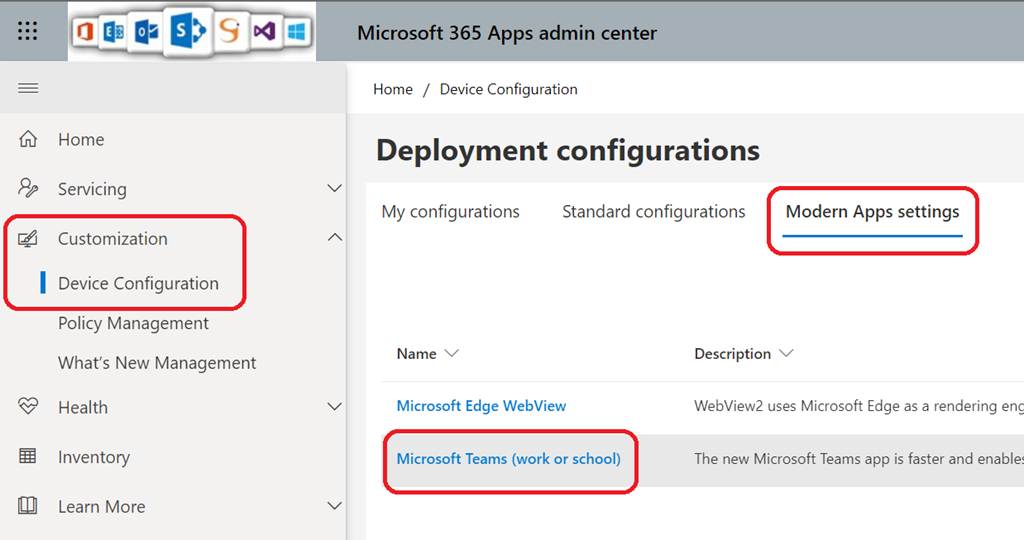
If you want to control how and when to deploy the new Teams client, uncheck the option Enable automatic installation of Microsoft Teams
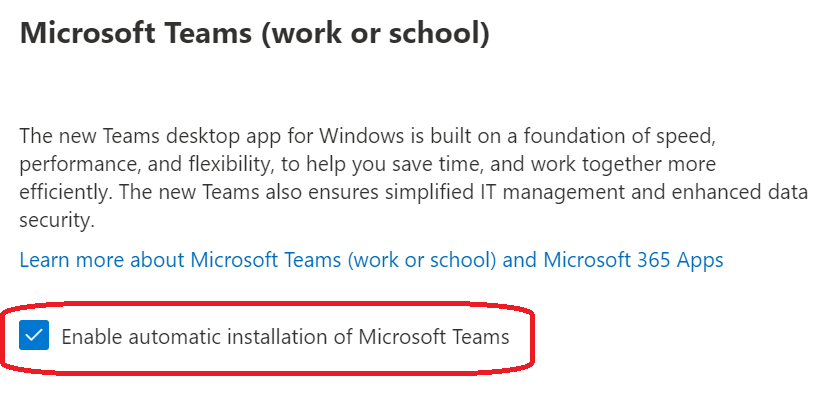
If you disable the automatic installation, you will have to follow the instructions available here https://learn.microsoft.com/en-us/MicrosoftTeams/new-teams-bulk-install-client/
NOTE the corresponding download link will be available later in August