

If you already have Exchange 2010 deployed within your organization, you can manage your Exchange organization hosted by Office 365 through the Exchange Management Console.
If you don’t have Exchange deployed, you can install ONLY the administration console by customizing the installation of the evaluation version to select only the administration console.
So, you have now the Exchange Management Console, what do you have to do to manage your Exchange organization on the cloud?
Launch the Exchange Management Console from the Start Menu

Right click at the console root and choose Add Exchange Forest
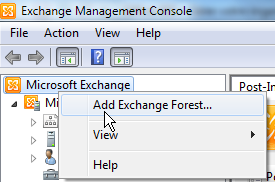
When asked, provide a friendly name (use to display on the console) and select Exchange Online from the FQDN drop down field

Provide your Office 365 credentials


The management console is connecting to Office 365 and gathering user permission


If you have multiple Office 365 tenant, you can repeat these steps; however, ONLY 3 Exchange forest can be added onto the Exchange Management Console.